Your entire sales pipeline —
scrape to close
Review, filter, and work your leads from SEEK, Indeed, LinkedIn, and Reed. Track companies through the BD cycle. Priority badges tell you what’s hot.
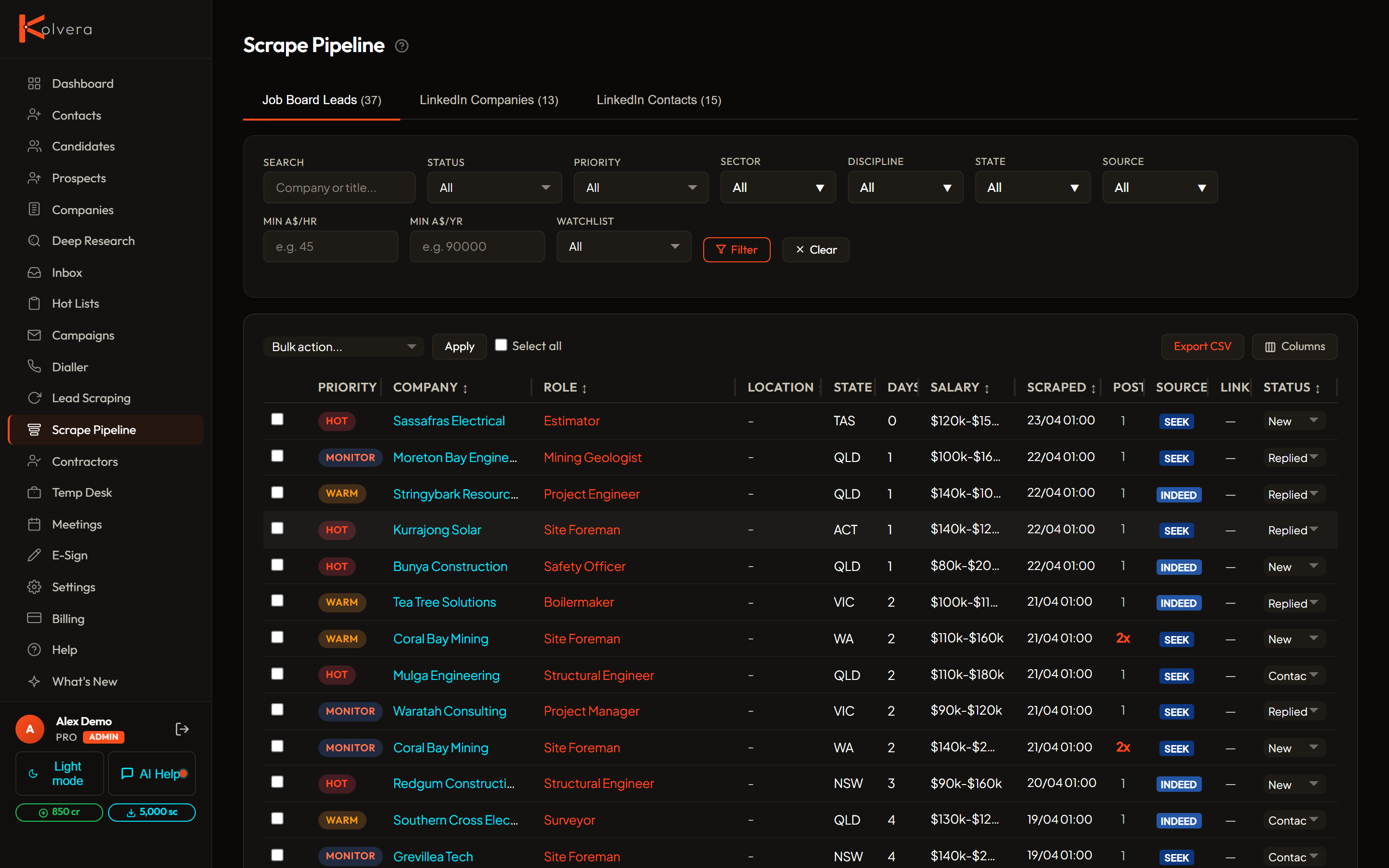
Review, filter, and work your leads from SEEK, Indeed, LinkedIn, and Reed. Track companies through the BD cycle. Priority badges tell you what’s hot.
From raw scrape to closed deal in four steps.
Run a scrape from any supported job board. Each lead creates a job listing and contact record, automatically linked to the hiring company so you always know who posted what.
Search by company or title, and filter by status, priority, sector, discipline, state, salary, or source. Priority badges rank leads by recency so the freshest opportunities surface first.
Find verified emails (2 credits) and phone numbers directly from the pipeline view. Bulk actions let you enrich multiple leads at once without clicking through individual records.
Move leads through clearly defined stages: New → Contacted → Replied → Meeting Booked → Terms Signed → Placed → Dead. Every stage change is logged with a timestamp.
Built for recruiters who need to move fast and stay organised.
HOT (7 days or less), WARM (14 days or less), MONITOR (30 days or less), LOW (over 30 days). Applied automatically based on job posting recency so you always know where to spend time first.
Scraped job records that match an Ideal Client Profile surface as Pipeline Matches inside the ICP desk — company, title, salary, location, and source in one view, so leads land against the profile they fit.
When a company reposts the same role, the repost count climbs — a strong tell that they are struggling to fill it. Repeat reposters are your warmest business-development targets.
Five hero stat cards, ICP health table, campaign performance bars, collapsible activity log, and low balance warnings — all on a single screen so you start every session with a clear picture.
Export 21 fields per row for any filtered or selected set of leads. One credit per row, with the first 50 rows each month free on all plans. Filtered exports include only what’s currently on screen.
Set status, delete, enrich, add to campaign, or promote to prospects — across a cherry-picked selection or the full filtered view. A real-time progress log shows the outcome of every action.
Promote contacts into a structured five-stage sales pipeline: Lead → Qualified → Proposal → Negotiation → Customer. Available on all plans, with no seat or volume cap.
Pipeline management is part of your subscription — no extras required.
Scraping uses your monthly allowance. Enrichment is charged per contact found.
Pipeline works best when paired with enrichment and outreach.
50 credits and 200 scrapes on every trial. No card required.