Know who to
approach next.
Find companies hiring in your niche.
Research the contacts. Prepare your approach.
Recruitment BD for independent agencies. Keep your existing ATS.
14 days · no card required · 50 credits included
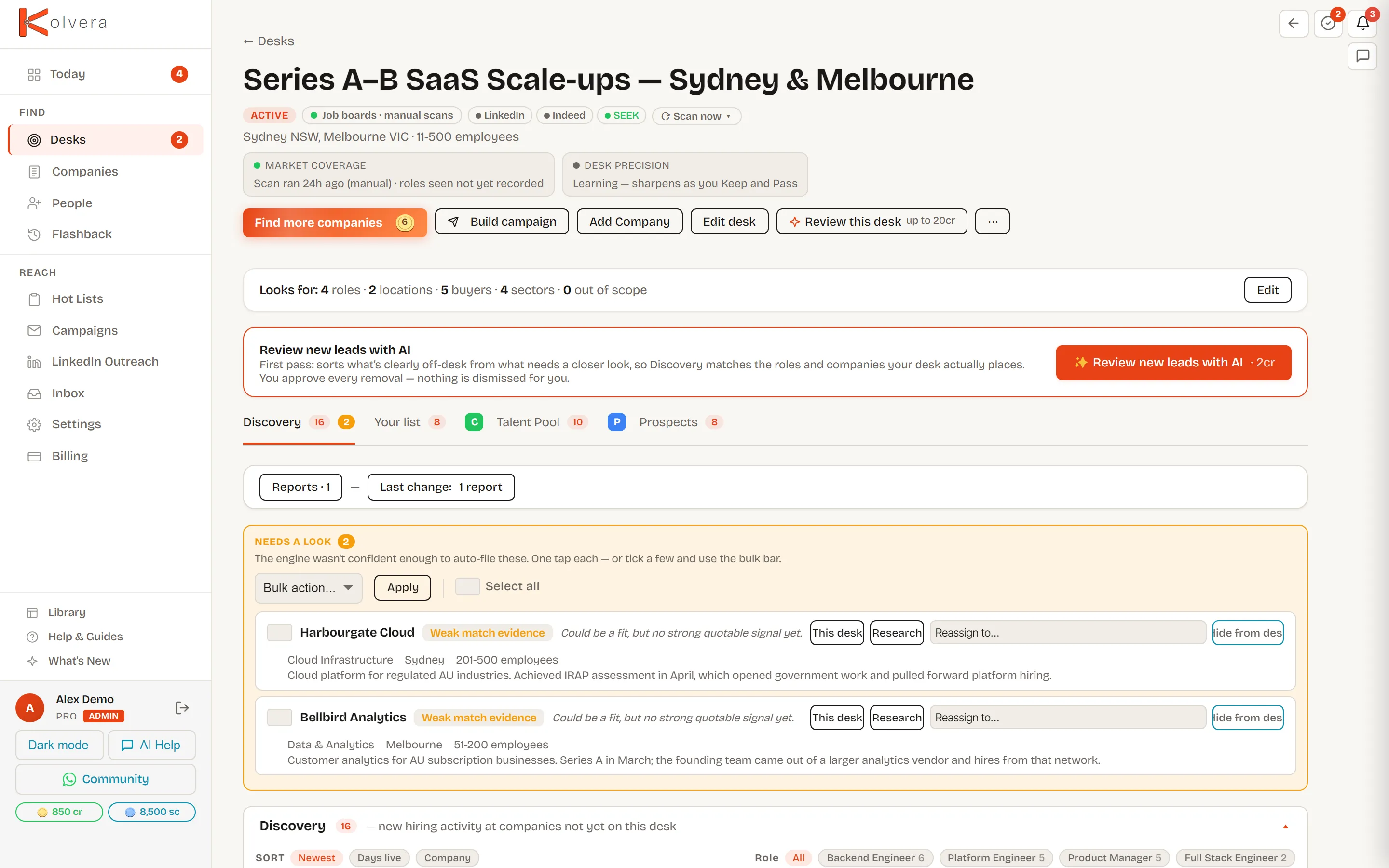
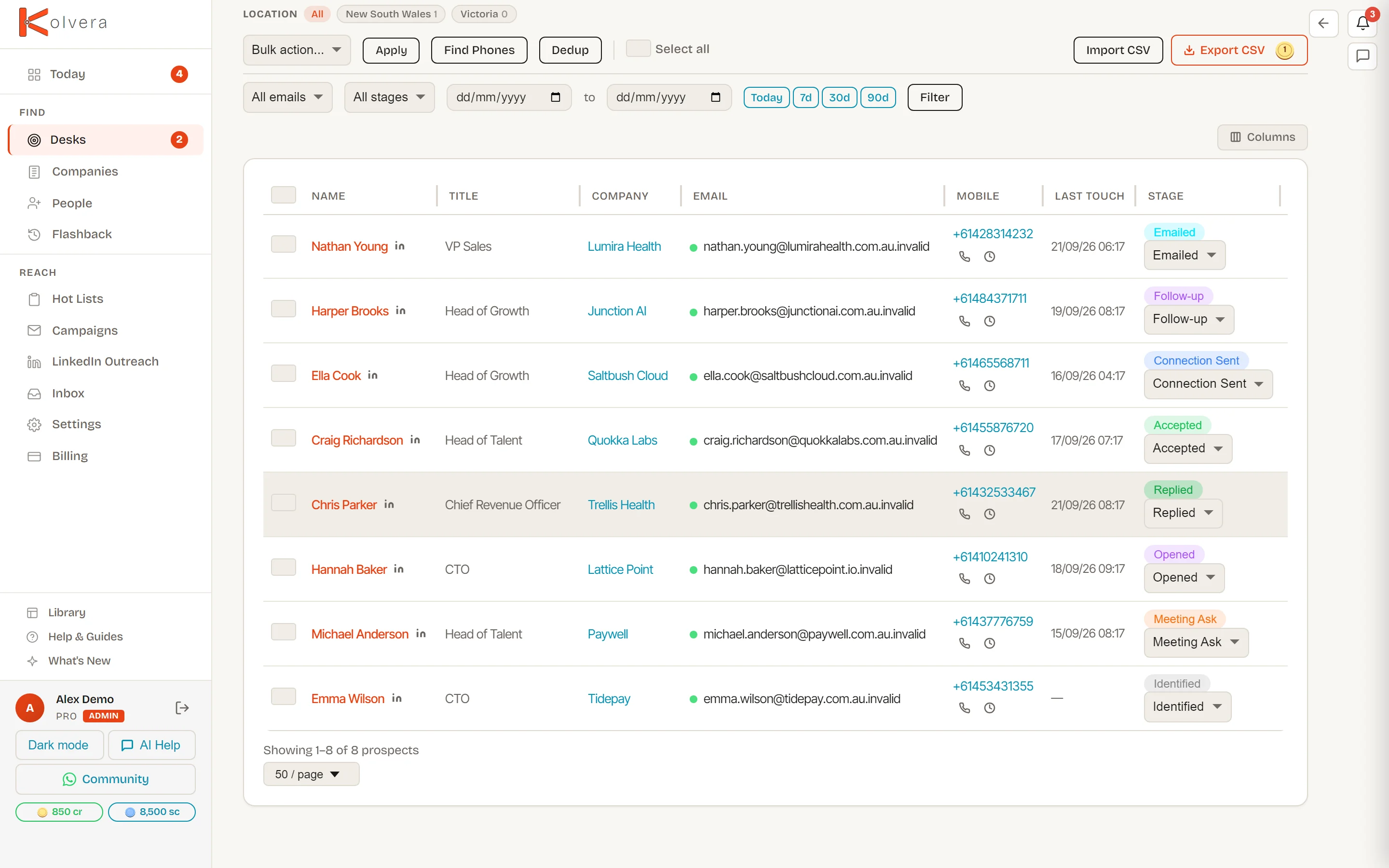
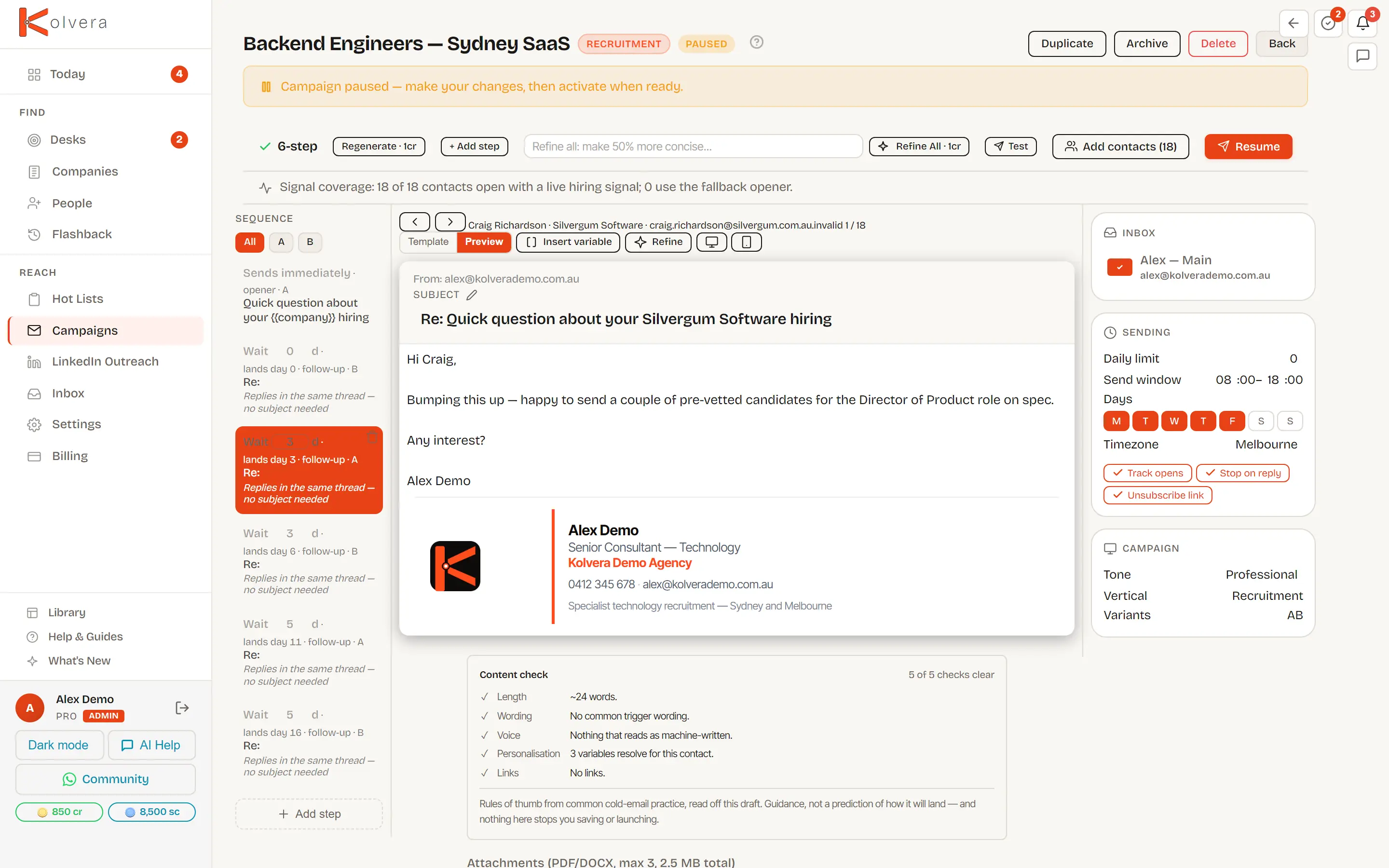
Review the roles, then find hiring contacts. Kolvera watches on the schedule you choose; you decide what gets sent.
Pro A$99/month, or A$79/month billed annually.
- ProDime Group
- PGR Search
- JP Crew
- Patterson Recruitment
From hiring signal
to first approach.
From a hiring signal to an approach worth making. Explore a demo desk, one decision at a time.
A company. A hiring signal. A reason to call.
Describe your recruitment market. Review the employers and roles that match; Keep the companies you want and Pass on the rest.
Put a person behind the opportunity.
Find relevant hiring contacts and check available email addresses. Keep the people you want to approach together on your desk.
Start with context. Send in your own voice.
Preview the message for each person. Edit your draft and choose when to activate outreach from your connected inbox.
See the whole desk in under two minutes.
Follow the workflow from describing a market to reviewing your outreach.
Start free trial14 days · no card required
The whole desk in under two minutes.
Describe a market, review the matches, then prepare your approach.
Built by a recruiter, run by recruiters.
Read customer stories“Dan introduced me to Kolvera and I was really impressed by how many different aspects of our recruitment process it could help with. From Mail warming, to scraping and finding target companies and jobs online for prospective candidates, to being able to do a targeted outreach. It is developing all the time, and Dan has always gone above and beyond to offer support, in person training and be online for any help I needed.”
“Kolvera has helped us automate all of our Business Development and help streamline our outreach. Could not be happier with Dan and all his help. He a true legend!”Read full testimonial
“Kolvera has helped us automate all of our Business Development and help streamline our outreach. Could not be happier with Dan and all his help. He a true legend!”
Director, JP CREW Solutions
“Kolera has been a wonderful tool to assist me with my business development especially in identifying new clients and my ideal client. I’ve had success with the outreach campaigns and have organised quite a number of meetings as a result. I’m looking forward to Kolvera more and more and extending my reach to new clients. Dan has gone beyond to help me set up my account and campaigns, his service has been exceptional. Thank you Dan!”Read full testimonial
“Kolera has been a wonderful tool to assist me with my business development especially in identifying new clients and my ideal client. I’ve had success with the outreach campaigns and have organised quite a number of meetings as a result. I’m looking forward to Kolvera more and more and extending my reach to new clients. Dan has gone beyond to help me set up my account and campaigns, his service has been exceptional. Thank you Dan!”
Principal Consultant, Patterson Recruitment Pty Ltd

“I built the tool I always needed.”
Daniel Bryant · Founder, Kolvera & Zionic GroupGet setup support from the founderBD is the first thing to drop, and the last thing to recover.
Candidates ring. Clients chase. Your next BD session deserves a useful starting point: companies hiring in your market, with evidence behind the list.
“When you’re busy with inbound contact from candidates, spending hours on outreach sourcing can be painful.”
Use the hiring signal.
Make the approach your own.
Draft, review, then send
Use the company and hiring signals on your desk to draft an email sequence. Preview each contact’s message, edit it and choose when to activate the campaign from your connected inbox.
Sending limits and reply detection help manage the sequence. You remain responsible for the audience and the approach.
AI generation uses credits. You can also take selected contacts into your existing workflow.
Start free trialA reason to call.
Sources you can check.
For Australian markets, Kolvera combines ASIC company records, the ABR and live job ads with company research. Registry records help identify the business; hiring signals help explain why it belongs on your list.
Check the match
Review the employer, advertised role and research before keeping a company. Tune your market when the results are too broad.
Check the contact
Search for relevant people and verify available email addresses. A verified address reduces uncertainty; it does not guarantee a reply or a placement.
Working outside Australia? Choose your market during setup and check the results in your trial. Data sources and contact coverage vary by country.
Start free trialStart with one market.
Build a list you would actually use.
Use the trial to check fit before you commit: relevant companies, the right people and an approach you are comfortable sending.
- Choose the roles, locations and employers you recruit for.
- Review the matches, then find and verify contact emails where available.
- Check your draft outreach or take selected contacts into your existing workflow.
Research and enrichment use credits. Contact availability varies. You do not need to connect an inbox to review your first companies and contacts.
Choose a plan after you have checked your market. All prices in A$ (AUD).
Pro
2,250 credits · 6,000 scrapes · 3 seats · intelligence reports + float campaigns
Start free trialScale
7,500 credits · 12,500 scrapes · 5 seats · full desk + team management
Extra seats A$49/seat/mo on Scale.
Start free trial14-day free trial · No card required · Cancel anytime · No demo, no sales call · See the full comparison →
Get setup help from the founder
Annual plans include setup support with Daniel: review your market, configure a desk and work through your first prospecting workflow. Connections and sending depend on your accounts and readiness. Check the setup page for the included sessions and scope.
See what we set up →How your desk learns what fits
Every Keep and Pass trains your desk. Review the matches and tune your market as you learn what is useful.
It asks about broader patterns
Your decisions help the desk recognise less relevant matches. Review suggested preferences before applying broader changes.
It never hides the evidence
Less relevant matches remain available to review, so you can revisit your choices.
A Keep on a filtered lead relaxes an inferred rule. A rule you explicitly confirmed stays in place until you change it.
Both sides of the desk: candidate floats
Float a candidate
Build an Anonymised Profile and use it to prepare a campaign for relevant employers. Review the company matches and contacts before taking your candidate to market.
Candidate floats require a paid plan. The trial focuses on company research, contacts and outreach.
Building a campaign from one candidate.
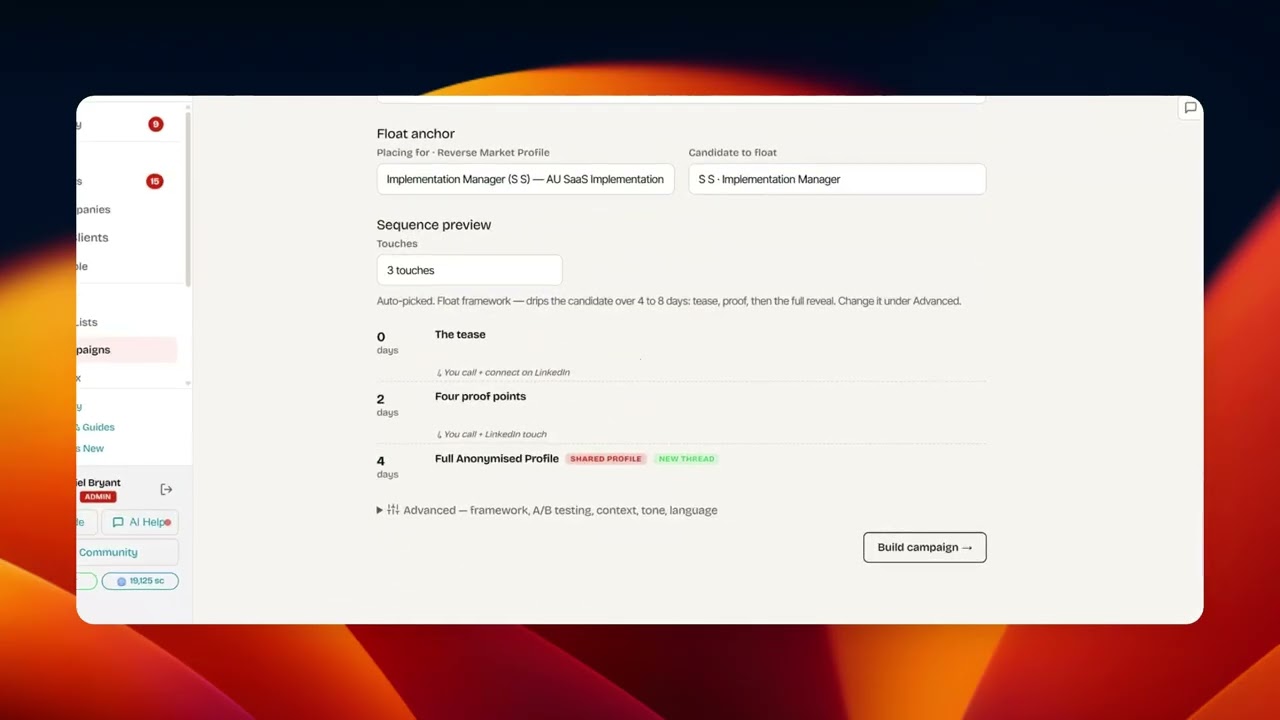
See the candidate-float workflow, then decide whether it fits your desk.
Quick answers
Setup, pricing and where Kolvera fits in your workflow.
Make your next BD session
about the right companies.
Choose one market. Review the hiring signals, find contacts and prepare your approach.
Start free trial14 days · no card required · 50 credits included