Reverse Market Profiles
A Reverse Market Profile is a search brief, not the candidate. It describes who you're pitching — the person themselves lives on their own People record, linked to the profile.
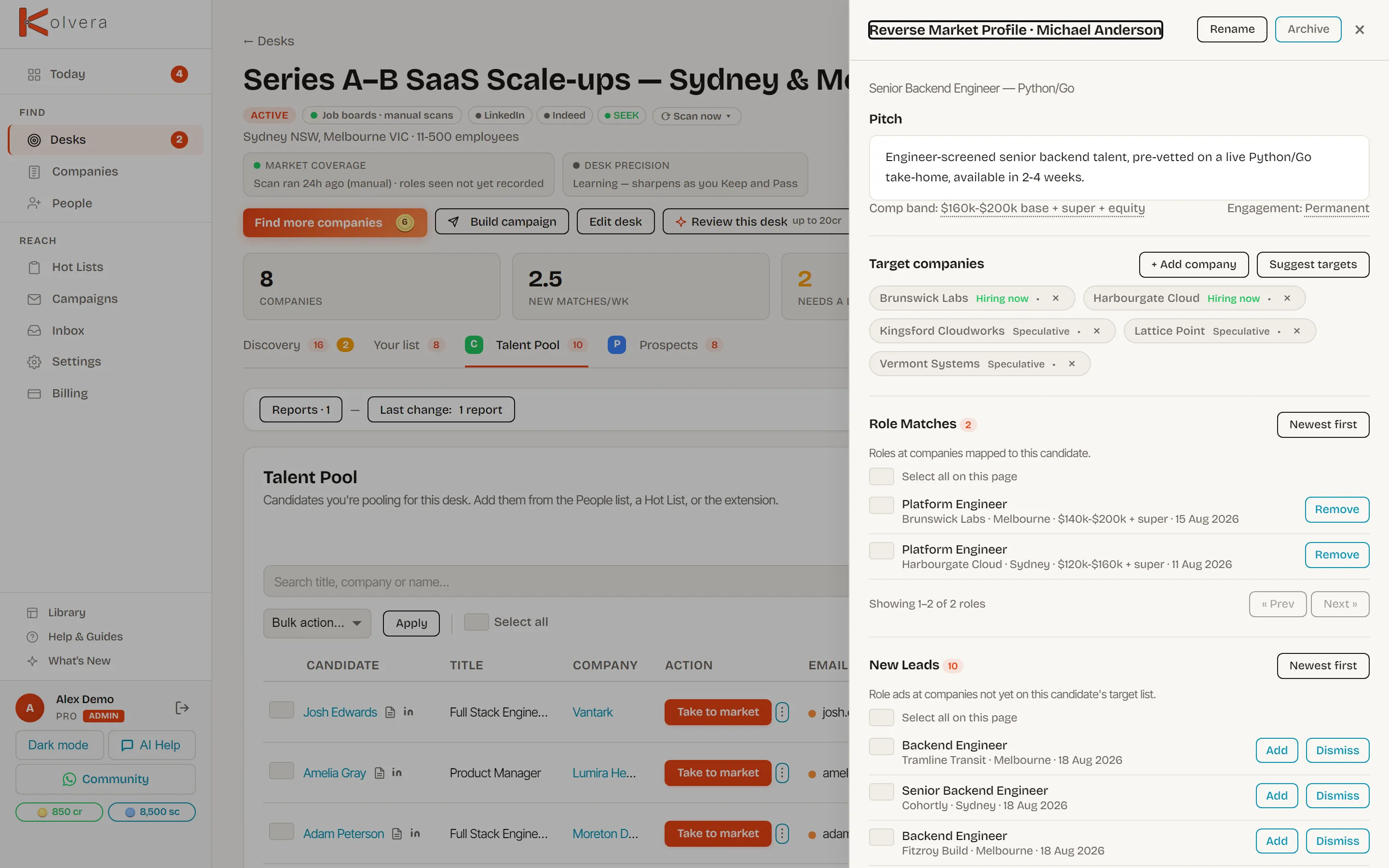
What a Reverse Market Profile is
A brief is easy to mistake for a copy of the candidate. It isn't. It's a role definition: title, must-haves, move triggers, target employers, disqualifiers, seniority, comp band, and the hiring titles worth pitching to. That's what powers everything downstream — company mapping, prospect enrichment, and the campaign copy. The real person — CV, transcripts, contact details — stays on their candidate record. The profile only points at it.
Opening the drawer
Reverse Market Profiles live inside a desk's Talent Pool tab, one drawer per candidate. On each row's right-hand side:
Skipping the “Attach to a desk?” prompt after Take to market leaves a profile with no desk, so it has no Talent Pool row to open from. Every desk's Talent Pool tab lists those at the top under Unattached profiles, each with a Link to this desk button. Linking one files it into that desk's pool, where it opens as a drawer like any other.
See Talent Pool for how candidates land on a desk in the first place.
Company exclusions
Where Company exclusions is available in the profile drawer, select a company and record a reason such as Already in process or Candidate request. You can also exclude a company from its target card. Add an optional private note, then review the affected outreach before confirming.
The exclusion applies to this candidate's market profile across its linked desks. It stops pending candidate marketing to that company. Sent messages remain in history; work already handed off or with an uncertain result cannot be recalled. Reasons and notes are not inserted into pitches, messages or client reports.
Restore eligibility allows new outreach after review. It never restarts old campaigns or queued actions. Historical company references stay visible until explicitly unlinked. If the profile changes while you are reviewing it, reload and review the current version before saving. Private meeting-derived profiles remain accessible only through their owner's authorised workflow.
The drawer's sections
The header carries two controls of its own: Rename turns the title into an edit box in place (Enter saves, Esc cancels), and Archive takes the profile out of the Talent Pool while keeping all of its data.
The lifecycle
- Create — click Take to market on a Talent Pool row (3 cr). Needs enough on file to work from — a candidate with no CV, notes, or messages will be refused rather than built from nothing.
- Company map — Suggest targets ranks the desk's own mapped companies against this candidate; review the preview, then apply it. + Add company files one on by hand. Both are free.
- Find hiring managers — runs contact-finding against the target companies and links every contact found back onto the profile as a prospect (2 cr per new contact with a verified email — you only pay for contacts it actually finds).
- Anonymised Profile — Anonymised Profile link builds a shareable profile with the candidate's identity stripped out, and hands back its link. Free. Calling it again reuses the existing Anonymised Profile unless you hit Regenerate.
- Float campaign — Build Float campaign opens campaign creation pre-loaded with this profile. See Float Campaigns for the sequence itself.
- Activation and replies — activate the campaign as usual. Each send resolves the Anonymised Profile link automatically; a reply pauses that contact's sequence like any other campaign.