"Prospect" and "Lead" mean two different things in Kolvera. A prospect is a person flagged for active sales outreach — same People file, with a Prospect role tab, tracked through a stage pipeline. A Lead is a scraped job posting — raw hiring-signal data, worked from the Desk it belongs to, or from the tenant-wide Leads Pipeline this page also covers. This page is the prospect-role reference plus the standalone Leads Pipeline; for the Desk's own Discovery and triage workflow, see Desks.
Adding a Prospect Role
Prospects aren't a separate page — adding a prospect role to a person surfaces them in the Prospect tab on their People file. Some paths ask you to pick a Desk on the spot; others don't and leave it for later. Either way, the Desk field on the person's Prospect tab stays editable afterwards.
Add Prospect (People page header) — create a brand-new prospect record directly, with an optional Desk field on the form (defaults to "No Desk")
From a person's file — click Make Prospect (or Add Prospect, if they're already a candidate) on their People file; no Desk is chosen at this point
Bulk from People — two separate bulk actions: Make Prospect just flips the role for the selected people, no Desk involved; Add to Desk as Prospect (buyer) does both at once — it requires picking a Desk and adds every selected person as a prospect on it
From hot lists — the Add to Prospects action on a hot list opens a modal with an optional Desk picker, so you can file everyone straight onto a Desk in one step
Always on — the prospect role is available on all plans as a core feature
Pipeline Stages
Every prospect carries one outreach stage, from first identification through to a won or lost outcome. Email and LinkedIn activity advance the stage automatically where it can be detected, and you can set it by hand at any time.
Identified — newly added prospect, not yet worked
Enrolled — added to a campaign, awaiting the first send
Emailed — outreach email sent
Opened — the prospect opened an email
Replied — the prospect has responded
Bounced — the email did not deliver
Connection Sent — LinkedIn connection request sent
Accepted — LinkedIn connection accepted
Follow-up — a follow-up message has gone out
Meeting Ask — you've asked for the meeting
Meeting Booked — a meeting is on the calendar
Soft Close — working towards agreement
Won — the prospect converted
Lost — no longer being worked
Where Prospects Live
There is no standalone Prospects page any more — the old /prospects list is now a redirect. Prospects show up in two different places, and it's worth being clear about which is which:
The People page (
/people?view=prospects) — every prospect across your whole workspace, in one flat list with role-tab filtering, search and bulk actions. This is where an old
/prospects bookmark or link lands you — see
People for the full list, search and bulk-action reference.
A Desk's Prospects tab — the same underlying records, but scoped to one Desk: only the decision-makers linked to companies mapped on that Desk, in a flat sortable table with inline Find Email / Find Phone. Open a Desk and click its
Prospects tab. See
Desks for the full tab reference.
Filtering the People page to view=prospects shows prospects from every Desk at once; a Desk's own Prospects tab narrows that same set to companies on that one Desk. Use the People page to work your whole outreach queue, and a Desk's Prospects tab when you're focused on one target market.
Discovery
New hiring signals arrive on a Desk's Discovery tab, not here — this page won't repeat that mechanic. See Desks for how Discovery and Your list work, Keep, Pass, Confirm and Hide — which one to use for exactly what each triage button does, and How Your Desk Learns for how Keep and Pass teach the Desk your taste over time. Monitoring schedules and sources are covered in Lead Scraping & Monitoring. A Reverse Market Profile opens from the Desk it's linked to and shares that Desk's monitoring — there's no separate schedule to configure on the profile itself.
Companies
Account-based CRM — every interaction with a company in one place, across overview, BD activity, research intel, signals, contacts, job leads, call and email history. See Company Search for the full company detail tab list.
Company Watchlist
Monitor companies without blocking or deleting them. The same list also feeds the Leads Pipeline's Competitors tab, once competitor inclusion is turned on for a Search Config.
Toggle — the Watch button on a company's detail page, or Add to Watchlist in its Block dropdown
Icon — watched companies show an orange eye icon on the Companies page and on the Leads Pipeline's Job Board Leads tab
Filter — the Watchlist dropdown on the Companies page shows watched-only; the Leads Pipeline doesn't have a filter, only the icon and an "Add to competitor watchlist" bulk action
Manage — Settings → Competitor Watchlist lists every watched company and lets you remove one
CSV Import and Export
Import companies from CSV with auto-detect columns (company, domain, state, industry, size, status). Deduplicates by company name. Export filtered or selected companies to CSV.
The Leads Pipeline
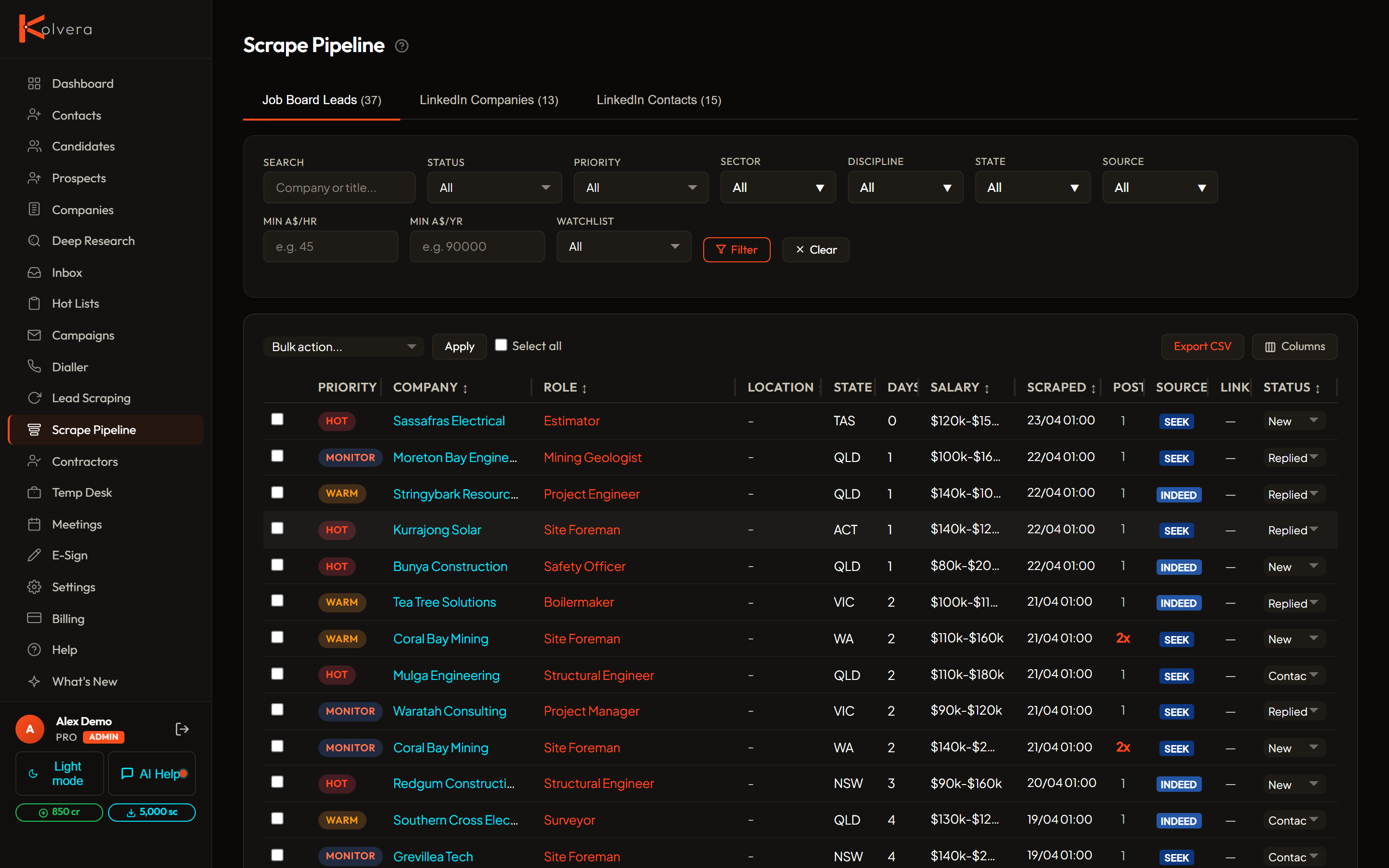
Beyond a single Desk's Discovery queue, every scraped job posting across your whole tenant also lands in one tenant-wide table: the Leads Pipeline, reached from the tabs on the Lead Scraping page. It's four separate tabbed views over two different data sources, not one list:
Job Board Leads — every job posting scraped from SEEK, Indeed and Reed, across every Desk, in one filterable, sortable table.
LinkedIn Contacts — people saved from LinkedIn via the Chrome Extension, listed separately from the job postings above.
Competitors — postings at companies on your Competitor Watchlist, for any Search Config with competitor inclusion turned on. Ask the Kolvera assistant to enable competitors on a config; it isn't a page toggle.
Job Board Leads and LinkedIn Companies rows carry the same two fields:
Priority is automatic based on recency: HOT (≤7 days), WARM (≤14 days), MONITOR (≤30 days), LOW (>30 days)
Status tracks your outreach progress: New → Contacted → Replied → Meeting Booked → Terms Signed → Placed → Dead. Change it per row, or select rows and use the bulk action menu's "Mark …" options.
Bulk actions: Find Contacts, Research, mark a status, delete, add to the Competitor Watchlist, or block a company as an agency, Do Not Contact, or custom — select rows and choose one from the bulk action menu.
Prospect features
Full People file — open any prospect to view their complete record with email history, activity, campaigns, meetings, and enrichment data
Bulk actions — from the People page, select multiple prospects to find emails or phones, verify emails, add to a hot list, enrol in a campaign, add to a Desk, or delete
Desk association — each prospect can be linked to a Desk, showing which target market they belong to
Target role — track which vacancy you're recruiting for against each prospect, editable on the prospect's own Prospect tab
The prospect role is available on all plans — no module activation required. One person can hold both a prospect and a candidate role at the same time, all from the same People file.